MCPs: I Waited Too Long
I'd been putting off MCPs for months — 'servers', 'protocol', 'infrastructure'. Easter Monday I finally dug in. Forty-eight hours later I had a macOS timer app Claude Code can control. The barrier was entirely in my head.
MCPs: I Waited Too Long
Field notes from a senior technical person trying to carve out time for deliberate exploration in the middle of client work.
I had a free day last week. Easter Monday, the whole team off, no client calls. I'd been meaning to dig into MCPs for months and kept putting it off. My mental model of them was vague and slightly intimidating — servers, protocol, infrastructure. It felt like a rabbit hole I didn't have time for.
I was wrong. Here's what actually happened.
What I thought MCPs were
Model Context Protocol. The name doesn't help. "Protocol" implies complexity. "Server" implies something you have to stand up and maintain. I'd seen the acronym in enough conversations that I knew it was relevant — Claude Code can connect to MCP servers to reach external tools — but I'd been getting by without them and kept deferring the learning.
What I thought I was signing up for: a weekend of reading specs, configuring infrastructure, debugging transport layers.
What it actually is: an API wrapper with a standard shape. That's it.
If you've ever integrated with a third-party API — and if you're a developer, you have — you already understand 90% of MCPs. The protocol just standardizes how you expose those integrations to an AI agent. There's a standard way to declare what tools are available, a standard way to call them, a standard way to return results. Claude Code knows how to speak that language. You just need something on the other end that does too.
What I built in an afternoon
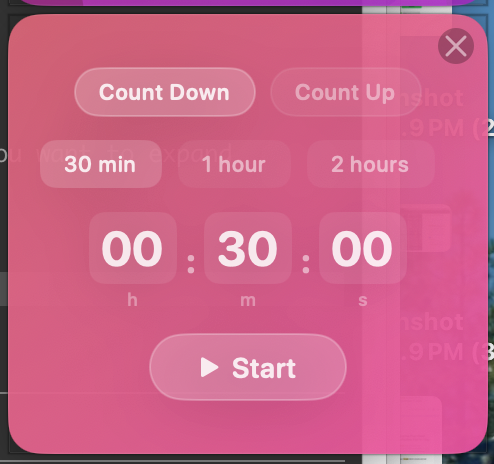
I needed a timer. I was planning my day in blocks and wanted something ambient — a small floating window I could glance at without breaking flow. I looked briefly for a macOS timer I liked. Didn't find one. So I built one.
Then I thought: what if Claude Code could control it?
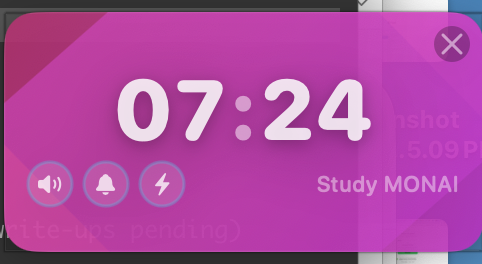
Forty-eight hours later I have Flux Timer — a macOS menu bar app written in Swift with animated gradients that shift from cool blue to urgent amber as your countdown approaches zero. It looks genuinely beautiful. More importantly, it has an MCP server baked in.
The architecture is straightforward. A standalone flux-mcp-server executable communicates with Claude Code via stdin/stdout (the standard MCP transport). It talks to the running Flux app over a Unix domain socket at /tmp/flux-timer.sock. The chain looks like:
Claude Code ↔ flux-mcp-server (stdio) ↔ Unix socket ↔ Flux Timer app
Claude Code gets eight tools and three resources. The tools:
flux_create_timer— create a countdown or countup with optional labelflux_start_timer— start or resumeflux_pause_timer— pause a running timerflux_reset_timer— reset to initial stateflux_stop_timer— stop and log the session to historyflux_get_timer— read current state (elapsed, remaining, label, alerts)flux_list_timers— list all active timersflux_update_timer— change label or toggle sound/notification/flash mid-run
And the resources Claude can read without calling a tool:
flux://timers— live state of every active timerflux://history— completed sessions with durations, timestamps, completion reasonflux://settings— theme, palette, alert defaults, presets
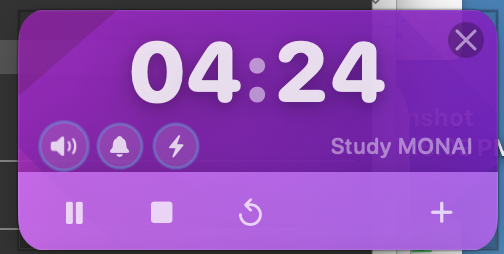
In practice, a session looks like this:
create_timer(countdown, 2700, "Refactor")
  → returns timer_id: "abc-123"
start_timer("abc-123")
  → state: running
get_timer("abc-123")
  → remaining: 1850
update_timer("abc-123", sound: false)
  → silences alerts mid-run
stop_timer("abc-123")
  → closes window, logs to history
In natural language it's just: "Create and start a 60-minute countdown labeled 'ConPort init'. Then load project context and tell me where we left off." Claude hits Flux to start the timer, loads the project brain, gives me an oriented summary. I go from opening my laptop to working with full context in about 30 seconds. When time is running low, I can ask Claude to check the timer and adjust what we're focusing on accordingly.
The MCP integration took less time to build than the gradient animations. That tells you something.
The thing I actually learned
It's not about MCPs specifically. It's about a mental shift.
Every tool I use every day is now a potential Claude Code extension.
I already knew these tools had APIs. I've integrated with APIs my entire career — it's not a foreign concept. What I hadn't done was connect that existing skill to the agentic development workflow I've been building. MCP is just the standard shape that makes those integrations available to Claude Code without any special glue code per tool.
The barrier I'd constructed in my head — MCPs are infrastructure, I'll get to that later — was completely artificial. I could have built Flux's MCP layer before I knew what MCP stood for. I'd just never thought of my timer app as something that should talk to my AI agent.
Now I'm sitting here making a list of tools I use every day and asking: what would it mean for Claude Code to be able to reach into this?
What's coming
This is the first post in a short series I'm writing about specific things I'm learning to stay current as a working CTO and agentic development consultant. Not tutorials — field notes. What it actually looks like to carve out time for deliberate exploration when you're in the middle of client work, product builds, and everything else.
The next few posts in this thread:
Giving Claude Code a project brain — I spent part of the same day setting up ConPort, a database-backed MCP server that stores architectural decisions, progress, and institutional knowledge for each project. The problem it solves: every Claude Code session starts from zero, and re-explaining your project history is expensive and incomplete. ConPort fixes that. I ran an "archaeology session" on one of my active codebases and watched it pull eight architectural decisions and sixteen progress entries from the existing docs and code. That post is worth reading if you work on multiple projects simultaneously.
Integrating real client tooling — I'm planning to wire up Coiled (the data pipeline framework we use at a current client engagement) and Clerk's existing MCP. The interesting question there isn't "how do I build an MCP" — it's "when do you build your own vs adopt an existing one, and what does that decision look like for a CTO evaluating toolchain choices for a team?"
The through-line across all of these: I'm a CTO who's been building with agentic workflows for about a year. I have opinions about what works. These posts are me thinking out loud about the tooling layer, not selling a methodology.
Dave Shak is a Fractional CTO and Agentic Development consultant based in Kitchener-Waterloo. He has 20+ years of experience scaling engineering organizations and now helps teams adopt agentic development workflows.